


GORGI VPN
4.41.13K Reviews
App Specs
- Version
- 5.0.7
- Updated On
- License
- Free
- Downloads
- 1,000,000+
- Developer
- PRIVATEX VPN PROXY APPS
- Categories
- Tools
- Platform
- Android
Screenshots


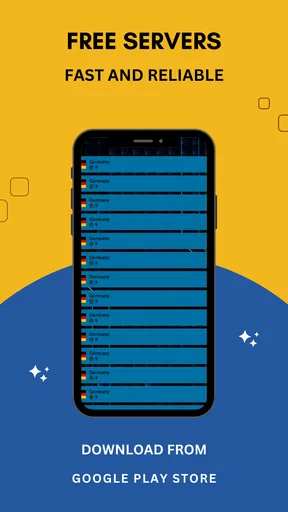
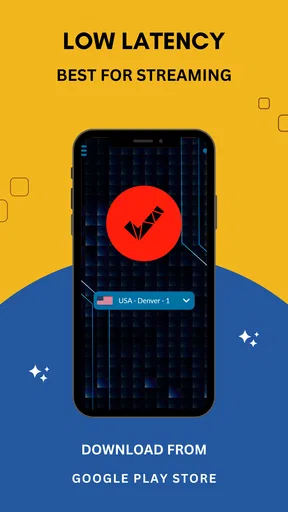
 Analysis by AppCompare
I often reach for a VPN when I’m using a network I don’t control, but the usual routine can be more irritating than the risk it is meant to address: choose an app, work out how to connect, then wonder whether it is still running when I need it. GORGI VPN is aimed at making that step feel less like a task. It is a free Android tools app from PRIVATEX VPN PROXY APPS, and its appeal is easiest to judge by a practical question: does it reduce the effort of getting a VPN connection started, without asking for more attention than the moment allows?
Why a quick connection matters
A VPN can be useful for protecting traffic on public Wi-Fi and for changing the apparent location of a connection, but it is not a cure-all for online risk. It does not make suspicious links safe, replace strong account passwords, or guarantee that a website or streaming service will work. I find it helps to treat a VPN as one layer in a sensible routine rather than a magic shield. That distinction matters with any one-tap-style proxy app: convenience is valuable, but it should not be mistaken for proof that every privacy question has been settled.
The basic use case is clear enough. If I am waiting in a café and need to check a booking, send a message, or sign in to a service, I want a connection step that does not turn a two-minute errand into a settings hunt. A compact VPN tool can make that routine easier, especially for someone who does not want to learn networking terminology before using it. The trade-off is that a simple interface can leave fewer visible clues about what is happening behind the connect button, so I still recommend checking the app’s connection state rather than assuming it is active.
Getting started without turning it into a project
The most useful way to approach GORGI VPN is to install it, open it when you have a moment, and learn the basic connection flow before relying on it outside. That small dry run lets you see what the app asks you to do and how you can tell whether a session is connected. It also avoids the awkward situation of trying to troubleshoot a new tool while standing in a queue or joining a call. On Android, the app is listed for devices running version 6.0 or later, which makes it an option for a broad range of older as well as newer phones.
When you first use any VPN, pay attention to Android’s own connection prompts and read them rather than tapping through automatically. A VPN needs the operating system to route traffic through its connection, so a system prompt is part of the setup, not an unusual error. After connecting, I would check that the app still shows an active session before handling something sensitive. If a connection drops, pause before continuing with the task; the useful habit is not simply pressing connect once, but confirming the protection is actually in place when it matters.
GORGI VPN has a 4.4 average from around 35,000 ratings, and it has been installed over a million times. Those figures suggest that many Android users have tried it, but popularity alone cannot tell me whether a VPN is right for a particular privacy need. I would use the rating as a reason to consider the app, not as a substitute for thinking about the kind of activity I plan to protect or the level of transparency I expect from a privacy tool.
Where it fits into an ordinary day
I find this section most useful for deciding when to open the app, rather than leaving a VPN running out of habit. I’ll look at the small moments—checking directions on shared Wi-Fi, handling a quick message, or preparing for a call—where a short connection routine can save hassle, and where a direct connection may be the better choice. Matching the tool to the task is what keeps convenience from becoming another chore.
Worth Reading Before You Choose

EA SPORTS FC Mobile 26 Is a Bigger Football Game, but It Takes Time

Flipboard Shows What News Apps Must Do Beyond the Feed

Switching to Android Auto Means Rethinking Your Driving Routine

Google Calendar Makes a Crowded Week Easier to Manage

Ludo King Makes the Most of the Minutes Between Plans

Baby Panda World Brings Quick Play to Modern Phones, but Its Game Library Feels Busy
A practical public Wi-Fi routine
Imagine I have a few minutes between appointments and connect to the Wi-Fi at a station or café to look up a route and reply to a non-urgent message. This is the kind of low-friction moment where a VPN can be worth having: I can start the connection before opening the relevant apps, do what I need, and disconnect when I no longer need it. For banking or other sensitive accounts, I would still prefer a trusted network and the service’s own security controls where possible. A VPN can reduce exposure on a shared network, but it does not remove the need to check the site or app I am using.
There is also a useful distinction between “connected” and “working well enough for this task.” If a page takes longer than expected, I would try a different connection location or briefly disconnect to compare, rather than repeatedly refreshing and assuming the phone is at fault. A VPN adds another leg to the network route, so speed and responsiveness can vary with the network, server load, and distance. That is a general trade-off of VPN use, and it is why I would not promise that every video, download, or call will feel as fast as it does on a direct connection.
Location changes and expectations
A VPN may be useful when I want a website to see a different apparent location, but this is not a guaranteed way to unlock every region-limited service. Platforms can use account settings, payment region, device location, or other checks in addition to the network address. If a service refuses to load, repeatedly switching locations may waste time or conflict with its terms. I would treat location selection as a practical tool for ordinary browsing, not as a reliable workaround for every catalogue or access restriction.
This is where a general-purpose VPN differs from a dedicated browser privacy feature or a service-specific network option. A browser’s private mode mainly affects local browsing history; it does not by itself hide network traffic from the Wi-Fi operator. A VPN routes traffic through another connection, but users then need to consider the VPN provider as part of their trust model. For someone who only wants to avoid saving a search on a shared phone, private browsing may be simpler. For someone who wants a network-level layer while using public Wi-Fi, a VPN is the more relevant category of tool.
Who will appreciate the simplicity
I can see GORGI VPN suiting Android users who want a straightforward VPN option for occasional browsing, travel days, or quick checks on shared networks. It is particularly appealing if you do not want to spend time configuring a collection of technical settings before you can make a connection. Its free price makes it easy to try, and its Everyone content rating means it is presented for a general audience. The app is currently at version 5.0.7, a detail worth checking when comparing installation requirements or deciding whether an older phone is supported.
On the other hand, I would steer a journalist, activist, frequent traveler handling sensitive work, or anyone with strict organizational privacy requirements toward a provider whose security model and operational practices they can examine in depth. For those users, the deciding issue is not just whether an app connects quickly; it is whether the provider’s claims, ownership, policies, and technical details meet a specific threat model. A consumer app can be convenient without being the right tool for high-stakes anonymity. A VPN also cannot prevent tracking through logged-in accounts, browser fingerprints, or information a user voluntarily shares.
Small habits that save time later
One practical tip is to decide in advance which tasks genuinely need a VPN. If I leave it connected for every activity, I may run into slower loading or services that object to a changed network location. If I only remember it after opening a page, I may have already sent a request over the ordinary connection. A simple routine—connect before joining unfamiliar Wi-Fi, verify the status, complete the task, then reassess—keeps the tool useful without turning it into a constant distraction.
Another helpful habit is to test the connection with an unimportant task before relying on it for something time-sensitive. That gives me a feel for whether the network and selected route are responsive at that moment. If a video meeting is about to start, stability may matter more than changing location; in that case, I would compare the direct connection with the VPN and choose the one that works reliably, unless the call involves a reason to keep the VPN active. No VPN setting is worth a dropped appointment simply because “connected” sounds safer in every circumstance.
I would also avoid treating an app’s reassuring language as a replacement for understanding its privacy terms. VPN traffic passes through the provider’s service, so choosing a provider is a trust decision. Before using any VPN for sensitive accounts, I would read its current privacy information and consider whether its approach matches my needs. This is not a reason to avoid a convenient tool for everyday use; it is a reason to distinguish casual protection on public Wi-Fi from a carefully researched setup for confidential work.
How it compares with other choices
Compared with manually configuring a VPN connection through Android, an app can be less intimidating because it brings the connection workflow into one place. Manual setup can be preferable for people who already have access to a trusted VPN service and want to configure its details themselves. Compared with a browser-only privacy mode, a VPN applies at the network-connection level rather than merely changing what the browser keeps on the device. Neither approach is universally better: the right choice depends on whether the problem is local browsing history, shared-network exposure, or a more demanding privacy requirement.
Compared with paid VPN services, a free app lowers the barrier to trying the category, but I would not make a decision on price alone. Users who need consistent performance, detailed controls, or strong assurance about privacy practices should compare providers carefully and decide what evidence they require. For occasional, low-stakes use, a simple tool may be enough; for work or travel where a connection failure has real consequences, spending time evaluating alternatives is sensible. The best option is the one that fits the task and whose limitations you understand.
What the rating can—and cannot—tell me
The app has around 1,100 written reviews alongside its larger pool of ratings. I find written feedback more useful when it describes a concrete issue, such as setup trouble or performance on a particular kind of network, than when it only says that an app is good or bad. Even then, other users’ experiences may differ because connection quality depends on location, phone, and network conditions. I would use reviews to spot recurring practical concerns, then test the app on my own device before making it part of an important routine.
GORGI VPN was released on March 4, 2024, and its developer is PRIVATEX VPN PROXY APPS. Those details help identify the product, but they do not answer the more personal question of whether its approach is suitable for you. If you mainly want a quick Android VPN to try on everyday networks, it is reasonable to see whether its connection flow feels comfortable. If you need documented assurances or advanced control, compare it with providers that make those priorities central before trusting it with sensitive activity.
First Impressions
The first thing that caught my attention was how straightforward the installation process was. You know how some apps make you jump through hoops? Not GORGI VPN. I was up and running in no time. As soon as you launch the app, you're greeted with a clean and intuitive interface. It's like the app designers knew exactly what we needed—simplicity and functionality.
Features Galore
Now, let's talk features. The app boasts a variety of servers spread across multiple countries. This means you can appear virtually anywhere around the globe with just a tap. Whether you're trying to access region-specific content or just want to feel like a digital globetrotter, GORGI VPN has got you covered.
- Unlimited Bandwidth: No more worrying about hitting data caps. Stream, download, or browse to your heart's content.
- High-Speed Connections: I was pleasantly surprised at how fast the connections were. You might even forget you’re using a VPN.
- Strong Encryption: With military-grade encryption, it feels like your data is wrapped up tighter than a burrito. Your online activities are kept private and secure.
- No Logs Policy: Privacy is taken seriously here. They don’t keep track of what you do online, which is a huge relief.
User Experience
Using GORGI VPN was a breeze. Switching between servers is seamless, and the app didn’t crash or slow down my phone, which is always a win in my book. It's like having a personal bodyguard for your online presence without the hassle.
For those who love customization, there's a nice touch with settings that let you tweak the app according to your preferences. Want it to launch automatically on startup? Done. Need to bypass specific apps? Easy peasy. It’s these little things that make the experience feel personalized.
Security and Privacy
In this digital age, we all need to be a bit more conscious about our online privacy. GORGI VPN ensures you’re not leaving a digital footprint. With its robust security features, I felt confident that my browsing data was safe from prying eyes.
"It's like having an invisibility cloak for your online activities."
Plus, the no-logs policy means they aren’t storing any of your data. It's a trust thing, and GORGI VPN seems to get it right.
The Final Verdict
After spending some quality time with GORGI VPN, I can say it’s a solid choice for anyone looking to enhance their online privacy and security. It's user-friendly, efficient, and packed with features that make it stand out in the crowded VPN market.
If you're in the market for a VPN that won’t break the bank but still delivers top-notch performance, give GORGI VPN a shot. It might just become your go-to app for all things privacy.
Pros
- Fast connection speeds for seamless browsing.
- User-friendly interface makes setup easy.
- Strong encryption ensures data security.
- Multiple server locations for global access.
- No-logs policy protects user privacy.
Cons
- Limited free version with restricted features.
- Occasional connection drops in peak times.
- Fewer servers compared to competitors.
- No dedicated app for routers available.
- Customer support response can be slow.
FAQs for GORGI VPN
What platforms is GORGI VPN compatible with?
GORGI VPN is compatible with both Android and iOS devices. Users can download the app from the Google Play Store for Android devices and the App Store for iOS. Ensure your device is running the latest operating system for optimal performance and compatibility.
Does GORGI VPN keep any logs of user activity?
GORGI VPN adheres to a strict no-logs policy, meaning it does not track or store any user activity while connected to the VPN. This ensures your online activities remain private and secure from third-party monitoring.
How easy is it to set up and use GORGI VPN?
Setting up GORGI VPN is straightforward. After downloading the app, users can quickly sign up or log in, choose a server from the list, and connect with a single tap. The user-friendly interface makes it accessible even for VPN beginners.
What features does GORGI VPN offer for security and privacy?
GORGI VPN provides advanced security features such as AES-256 encryption, a kill switch, and DNS leak protection. These features work together to keep your data secure and private, preventing unauthorized access and exposure of your online activities.
Is there a free version of GORGI VPN, and what are the limitations?
GORGI VPN offers a free version with limited server access and bandwidth. While it provides basic protection, upgrading to a premium plan unlocks additional features such as faster speeds, more server locations, and enhanced security options.


